eps1.5AI
Harness Engineering
What Harness Engineering is and how to prepare your repository to work with AI agents in a safe, predictable and productive way.
You and a teammate use the same model, in the same tool, on the same repository. For you, the agent gets it right on the first try, runs the tests and follows the project’s conventions. For your teammate, it makes up commands, ignores the linter and almost deletes a folder. The model is the same, so what changed?
Everything around the model changed. And that’s what we call the harness.
In the previous posts we covered the Context Window, Rules and Skills and Spec-Driven Development. All of that is part of the harness. In this post we take a step back to see the whole picture: what a harness is, which mechanisms it’s made of, how to measure the harness maturity of a repository and what to do to improve it.
Table of contents
- What does Harness mean?
- Agent = Model + Harness
- The layers of the harness
- The three mechanisms: guides, sensors and guardrails
- How does the harness run?
- What is Harness Engineering?
- Harness Score: measuring the maturity of a repository
- Conclusion
- References
What does Harness mean?
A harness is the whole set of gear used to fit and guide a horse safely. It isn’t just the saddle, where the rider sits. It’s the reins, the straps, everything that gives you control over the animal.

The analogy fits well, because the idea of a harness is to control where the AI goes, limit what it can do and give it guides and sensors so it can be more effective.
Agent = Model + Harness
Everyone talks about agents, but what is an agent? The most accepted definition today, popularized by LangChain’s article The Anatomy of an Agent Harness, is quite direct:
- Model: the LLM itself. Opus 5, Sonnet 5, GPT 5.6, Grok 4.7 high, Composer 2.5 etc.
- Harness: everything else. System prompts, skills, tools and MCPs (connectors that give the agent access to external systems, like Jira, Slack or a database), infrastructure (browser, file system etc.), hooks, orchestration logic and memory.
On its own, the model takes text in and gives text back. It doesn’t keep state from one conversation to the next, doesn’t run code, doesn’t access the internet and doesn’t install packages. All of that comes from the harness:
- System prompt: every tool (Cursor, Codex, Claude Code) has a prompt behind it that gets concatenated with your question. That alone already changes how accurate the agent will be.
- Skills, tools and MCPs: the abilities and tools the agent can call.
- Connected infrastructure: access to the file system, the terminal, a browser.
- Hooks: events fired before or after an action of the agent.
- Orchestration: subagents, task splitting, routing between models.
- Memory: what persists between sessions, like
AGENTS.md.
In other words: the model carries the intelligence, and the harness is what makes that intelligence useful.
The layers of the harness
You can see the harness as layers, a picture that comes from Birgitta Böckeler’s article on Martin Fowler’s website:
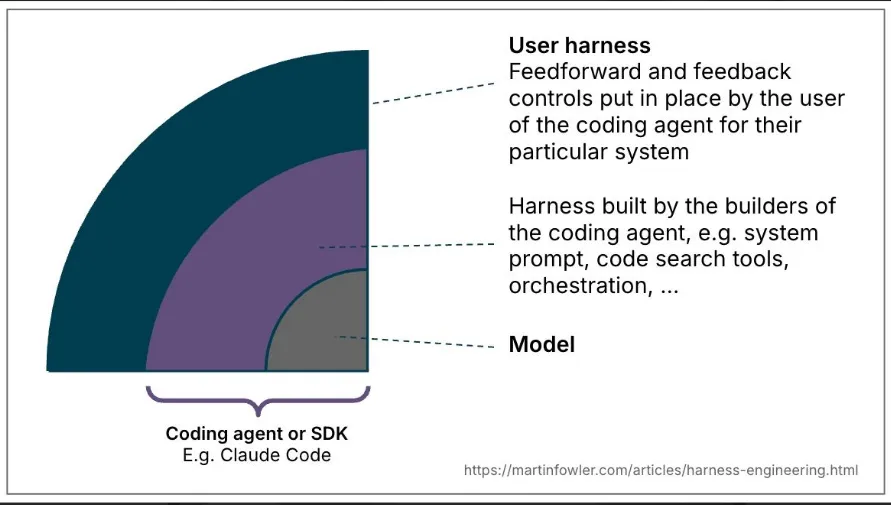
- Model: the center of everything. It’s the only part you don’t control.
- Coding agent: the harness the vendor already ships (system prompt, code search tools, orchestration). It’s updated with every new version of Cursor, Claude Code or Codex, and it’s proprietary. You can configure a few things, but you don’t change its core.
- User Harness: the controls you put in your own system. AGENTS.md, rules, skills, hooks, tests, lint, CI.
The focus of this post is the User Harness, the outer layer, because it’s the only one we can control.
The three mechanisms: guides, sensors and guardrails
The user harness is made of three kinds of mechanisms.
| Guides | Sensors | Guardrails | |
|---|---|---|---|
| Type | Feedforward | Feedback | Runtime |
| When it acts | Before execution | After execution | During execution |
| Examples | Prompt, AGENTS.md, rules, skills | Tests, linter, type checker, CI | Hooks, permissions, sandbox |
In short:
Guides suggest, Sensors detect and Guardrails prevent

Guides increase the chance of the agent getting it right on the first try. Sensors warn when it got it wrong, and a good sensor for an LLM is one whose error message already says how to fix it.
Guardrails, on the other hand, exist for a very practical reason. Imagine you don’t want, under any circumstances, the agent to run an rm -rf on the project. If you write that in AGENTS.md, that’s a guide, and a guide is non-deterministic: the model reads it, interprets it and may simply not follow it. Who has never asked the agent for one thing and watched it do something else?
You don’t want the agent to not delete your project 90% of the time. You want the project to still be there 100% of the time. That’s where the guardrail comes in, and it’s deterministic. In Claude Code, for example, a PreToolUse hook intercepts every terminal call before it happens. All you need is to register a script as a PreToolUse hook in .claude/settings.json:
#!/bin/bash
# .claude/hooks/block-rm-rf.sh
command=$(jq -r '.tool_input.command')

if [[ "$command" =~ rm[[:space:]]+-[a-zA-Z]*(rf|fr) ]]; then
  echo "rm -rf blocked by the harness. Ask the user for confirmation." >&2
  exit 2 # exit 2 blocks the call and sends the message back to the agent
fi
Notice that the error message already tells the agent what to do next. The guardrail blocks and, on top of that, works as a sensor.
Hooks are good for much more than blocking dangerous commands. They fire on agent events (before calling a tool, after editing a file, when a session starts) and can log what happened, add context, allow or deny the action. A real governance case: denying the execution of any MCP that isn’t on the company’s list of approved MCPs.
Rules vs Hooks
This is a common question, because both look like “rules”. The difference is in who decides:
- Rules can be always loaded, loaded on demand, applied only to files matching a certain pattern, or left for the agent to decide when to use, based on the description in the frontmatter (the metadata block at the top of the file, between
---lines). But even an “always on” rule is read by the model, and the model decides whether to follow it in that case. It’s inferential. - Hooks are events. If the event happens, the hook always fires and your script always runs. It’s deterministic (unless you call another LLM inside the hook, but that’s another story).
How does the harness run?

The harness mechanisms can run in two ways:
| Computational | Inferential | |
|---|---|---|
| How | Deterministic and fast | Semantic analysis |
| Examples | Tests, lint, type checker | AI code review, an LLM deciding whether a change is good |
| Cost | Milliseconds to seconds, practically free | Tokens and extra minutes on every run |
Inferential execution is powerful. With it you can have an LLM deciding whether a change can go to production, with no human in the loop. But it costs tokens and it costs time: putting an agent to think on every deploy can add minutes to the pipeline.
That’s why the golden rule is: whatever can be computational, keep it computational. Unit tests, lint and type checkers are cheap, fast and reliable, and plenty of repositories still don’t have all three set up. Use the inferential side for what only it can evaluate, like whether a change makes sense for the business.
What is Harness Engineering?
Harness Engineering is the intentional and continuous work of designing, adjusting and measuring everything around the language model (LLM), so that you can trust what it delivers.
An AGENTS.md that teaches the project’s conventions, a linter that runs after every edit, a hook that blocks rm -rf without confirmation. All of that is harness engineering.
The most important word in the definition is continuous. Code is alive and the harness regresses. Someone opens a PR, adds a bunch of contradictory rules, deletes AGENTS.md or lets it grow to a thousand lines. How do you know the harness got worse? Only by measuring, and measuring on a recurring basis.
At this point, you’re probably still left with questions like…
- How do I improve the harness of a repository?
- How do I apply this day to day?
- How do I know if I have a good harness?
- What should I do to improve it?
Harness Score: measuring the maturity of a repository
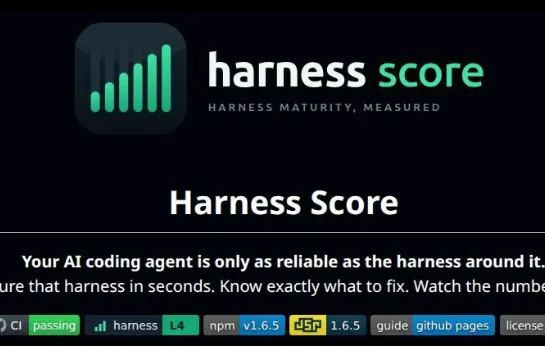
Harness Score is an open source tool, created by Fernando Paladini, that measures the harness maturity of a repository in seconds, points out exactly what to fix and tracks the number going up.
To run it, you don’t need to install or configure anything. Just be at the root of the repository:
npx harness-score
The most important insight: the analysis is deterministic. It looks at facts in the file system: whether AGENTS.md exists, whether the rules have frontmatter, whether there’s a CI pipeline, whether there are exposed secrets. In other words, it’s a computational check. It runs fast, spends no tokens and can go into the pipeline at practically zero cost.
Out of curiosity, I ran it on this blog’s repository:
harness-score v1.8.1  /home/renan/Documents/dev-root

Maturity: L0 · Unharnessed   Score: 26/105 (25%)   scopes: repo

Context & Guides     ██░░░░░░░░░░░░░░░░░░  10%  2/20 pts
Skills & Commands    ░░░░░░░░░░░░░░░░░░░░   0%  0/17 pts
Hooks & Guardrails   ░░░░░░░░░░░░░░░░░░░░   0%  0/14 pts
Sensors & Feedback   ████░░░░░░░░░░░░░░░░  20%  4/20 pts
CI Feedback          ░░░░░░░░░░░░░░░░░░░░   0%  0/14 pts
Hygiene & Safety     ████████████████████ 100%  20/20 pts

Improvements (25):
 ✗ CTX-01 Agent context file present (AGENTS.md) (+4 pts)
   Create an AGENTS.md at the repository root describing what the project is,
   how to build/test it, and the conventions agents must follow.
 ...
L0. The cobbler’s children have no shoes. 😅
Each item marked with ✗ is a check that didn’t pass, with a suggestion of what to do and how many points it’s worth. CTX-06, for example, asks you to split rules longer than 500 lines into smaller, scoped rules.
Maturity Score vs Effective Score
The harness doesn’t live only in the repository. By default, npx harness-score looks only at the repository (Maturity Score). With npx harness-score --scope user, it also considers what’s on your machine, like global skills and MCPs (Effective Score).
The 5 maturity levels
| Level | Name | What it means |
|---|---|---|
| L0 | Unharnessed | The repository gives the agent nothing: every session starts from scratch |
| L1 | Documented | There’s an AGENTS.md (or equivalent) that provides the feedforward |
| L2 | Guided | It already has some kind of skill, subagent or rules configured |
| L3 | Sensing | The feedback loop exists: linter, types, tests, CI pipeline |
| L4 | Self-correcting | It guides, verifies, blocks and corrects continuously |
Each level requires a minimum percentage in some dimensions and adds up the requirements of the previous ones, so a perfect CI without an AGENTS.md won’t get you anywhere.
The score is a compass, not the absolute truth
Since the analysis is deterministic, it doesn’t evaluate semantics. It knows your AGENTS.md exists, but it doesn’t know whether what’s written in it is any good. An outdated rule scores the same as a fresh one.
The official tutorial has an exercise that shows this well. First you create a deliberately verbose AGENTS.md. Then you summarize the file, keeping only the essentials. The score doesn’t change, but the harness improves: AGENTS.md is loaded in every conversation, and a thousand-line file takes up the context window for no reason (remember the post about the Context Window?). Ideally it works as a compact index, along the lines of “if you’re doing a code review, read this file; if you’re touching the database, read that other one”.
So read the score this way: it shows which AI tools you’re not using yet and why they’re worth it. An L1 doesn’t mean the harness is bad, it means there’s potential left on the table.
And to keep the harness from regressing, you can add the tool as a CI gate, failing the pipeline below a minimum level:
# .github/workflows/harness.yml
- uses: paladini/harness-score@v1
  with:
    min-level: '3'
In practice: from L0 to L4
The paladini/harness-score-tutorial repository is a template to walk this path on your machine, with whichever agent you prefer. The sample app is the Meeting Cost CLI, a small Node.js application that calculates the cost of a meeting from the number of participants, the duration and the hourly cost. It’s simple on purpose, so the focus stays on the harness.
Each step has a ready-made prompt. You run it, look at what changed, run npx harness-score and compare:
| Step | What the prompt does | Level |
|---|---|---|
| 0 | Creates the app with no harness at all | L0 · Unharnessed |
| 1 | Creates an AGENTS.md (verbose, on purpose) | L1 · Documented |
| 1B | Summarizes the AGENTS.md without chasing points | L1 |
| 2 | Adds a scoped rule, a skill, a workflow, .gitignore and a lockfile | L2 · Guided |
| 3 | Adds lint, formatter, type check, tests and CI | L3 · Sensing |
| 4 | Adds hooks: one that blocks destructive commands and another that formats after edits | L4 · Self-correcting |
| 5 | Adds the harness gate to CI to prevent regressions | L4 |
Since the agent is non-deterministic, each person will get slightly different results. What matters is seeing the level go up at each step and understanding why each artifact exists.
Conclusion
The model (LLM) is the part you don’t control, and it will keep changing over time. The harness is the part that’s in your hands, and it’s what makes the same model deliver very different results from one repository to another.
Guides so the agent gets it right on the first try, sensors so it notices when it got it wrong, and guardrails so certain things never happen. And, like all living code, the harness needs to be measured and looked after continuously.
A practical suggestion: run npx harness-score on the repository you work on the most today. Read the ✗ items, pick one and fix it. Then run it again. I already know what this blog’s next post will be: getting it out of L0. 😅